My AgentMate
Menu Close
  • Home
  • Log Into AgentMate
  • What is AgentMate
    • AgentMate Knowledge Base
  • Report a Service Outage
    • How to Troubleshoot a Browser Issue

Tip: Cached Pricing and Group Advantages

Posted on February 22, 2016 by o2_admin

Did you know that AgentMate has cached pricing for most major cruise lines? Yes! Each morning new pricing is loaded into the application and can be found on the Inventory > Search All Inventory screen. You can see pricing for Inside,… Continue Reading →

Tip of the Week Added Revenue, Search All Inventory

Browser Compatibility

Posted on February 16, 2016 by o2_admin

As technology continues to advance AgentMate continues to update its processes and procedures to stay current. Microsoft has stopped deploying software updates and bug fixes for older versions of Internet Explorer so AgentMate will no longer be accessible in IE10… Continue Reading →

Release Notes

Tip: Save Time Creating Leads and Reservations

Posted on February 15, 2016 by o2_admin

Did you know that you can start a New Lead or Reservation within AgentMate from the Client List screen? We’ve found this to be a very popular feature that Agents use as soon as they learn about it. After you have initially… Continue Reading →

Tip of the Week Client List, Client Profile, Lead Management, Time Saving

Quarterly NCOA Processing: Feb-2016

Posted on February 11, 2016 by o2_admin

As clients move and complete a Change of Address they invariably miss notifying some people, they may even forget to tell their Travel Agent! Because of this Vacation.com audits and updates clients opted-in for the Engagement Program on a quarterly basis. In many cases,… Continue Reading →

Release Notes Engagement, Marketing

Getting Started: Configuring your Browser

Posted on February 10, 2016 by o2_admin

AgentMate is cross-browser compatible, meaning it can be used in nearly every browser including Google Chrome, Internet Explorer 11+, Microsoft Edge, Safari, and Firefox. Currently we see most Agents using Google Chrome. AgentMate makes heavy use of Pop-up windows; because… Continue Reading →

Best Practices browser, chrome, recommended browser, troubleshooting

Tip: Save Time and Make Money with CruisePRO

Posted on February 8, 2016 by o2_admin

Did you know that AgentMate integrates with CruisePRO? That’s right! AgentMate and CruisePRO, Vacation.com’s best-in-class Cruise Booking tool, share a deep integration. From CruisePRO you can export your booking information into AgentMate, removing data entry from your daily to-dos. Starting your booking… Continue Reading →

Tip of the Week Added Revenue, CruisePRO, Integration, Time Saving

Release Notes: 4 Feb 2016

Posted on February 3, 2016 by o2_admin

Summary: In addition to various bug fixes, the release some updates to the Lead Management portion of AgentMate will be included. Individual bug fixes will be communicated back to the reporting User. Details: Lead Management Updates: Updates have been made… Continue Reading →

Release Notes Lead Management

Tip: Show Loyal Clients Their Loyalty Numbers

Posted on February 1, 2016 by o2_admin

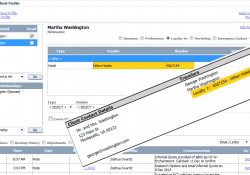
Did you know that AgentMate can store Loyalty Numbers for your clients? Not only does AgentMate provide a place for you to store your Client’s Loyalty Numbers, these loyalty numbers will automatically be included on the Client’s Invoice when that… Continue Reading →

Tip of the Week Client Profile, Customer Service

Tip: Book Allianz Insurance Directly in AgentMate

Posted on January 25, 2016 by o2_admin

Did you know that AgentMate has an integration with Allianz Insurance? Yes! AgentMate and Allianz Insurance have an ongoing integration that allows users to Quote, Book, and Pay for Allianz policies directly within AgentMate. The integration allows users considerable time… Continue Reading →

Tip of the Week Allianz, Insurance, Integration, Time Saving

Tip: Filter Reminders for Efficiency

Posted on January 18, 2016 by o2_admin

Did you know that you can Filter the Reminders on your Primary Dashboard? Yep! When you are on your Primary Dashboard, you can Select ‘Filter’ to change the parameters for the reminders you receive; those parameters will persist each time you come… Continue Reading →

Tip of the Week Reminders, Time Saving

Post navigation

Older Articles
Newer Articles

First Time logging in?

Check Here for important Tips about configuring your Internet Browser.

Categories

Recent Posts

  • Planned Maintenance – October 3, 2026
  • AgentMate Maintenance Complete
  • Important Security Maintenance – AgentMate Unavailable on Saturday, September 26, 2026
  • Quarterly NCOA Processing September 2026
  • Upcoming Visual Update in AgentMate – Login Screen Refresh

Tags

Academy access Accounting Added Revenue Adoption Agency News AgentMate anytime Anywhere Back Office Accounting Best Practice Bug Fixes Client List Client Profile Commissions CruisePRO Customer Service Documents e-Engagement Email Engagement Enhancements Groups Insurance Integration Invoice Knowledge Base Lead Management Links List Management maintenance Marketing NCOA Outage Preferences Query Tool Relationship Management Release Notes Reminders Reporting Reservation Maintenance Search All Inventory Time Saving travel insurance troubleshooting

Archives

Google Analytics

© 2026 My AgentMate. All rights reserved.
Hiero by aThemes